private CLOUD
My-Drive, a solution to secure access your files from anywhere, using your own private Amazon AWS account. It works with smartphones, tablets and PC's no matter the operating system.
VPN's are NOT required or recommended.
Scalable solution
The files storage is provided by a CLOUD hybrid implementation with Amazon AWS services in different geographic regions. For EU there are data-centers in Frankfurt, Paris, Dublin and Milan.
EU rules and regulations are respected for European companies.
Security
The client interfaces are Web based, available for any devices and operating systems. Files are stored in a private CLOUD S3 structure offered by Amazon (AWS S3 Obejct Storage). The system offers your data protection at any moment, using strong encryption at rest and in transit.

My-Drive
High scalability and security using a hybrid infrastructure. The solution can scale easily horizontally increasing the services support (API) servers number. One small VPC can offer services to one hundred users or more depending on usage and the VPC.
My-Drive manage the users and users groups access to resources. Any user can share folders to users or users groups at choice.
Support for software development is offered using standard secured access points API's.
Next services are implemented and can be used to extend the solution or integrate with other softwares:
• authorization
• file access (API)
• web server
All implemented services are based on open standards and can be easily consumed by third party software solutions.
The system use CLOUD and infrastructure services offered by Amazon AWS in order to create a secure and stable environment for file storage and file transfer. It solves the requirements for security of geographic distributed working points for today needs. A private CLOUD is used for files storage ( the Amazon AWS S3 Object Storage).
Files are encrypted during transfer and at rest, the process works on data transfer streams by offering a permanent encryption from the client to the storage and back.
For more information
My-Drive
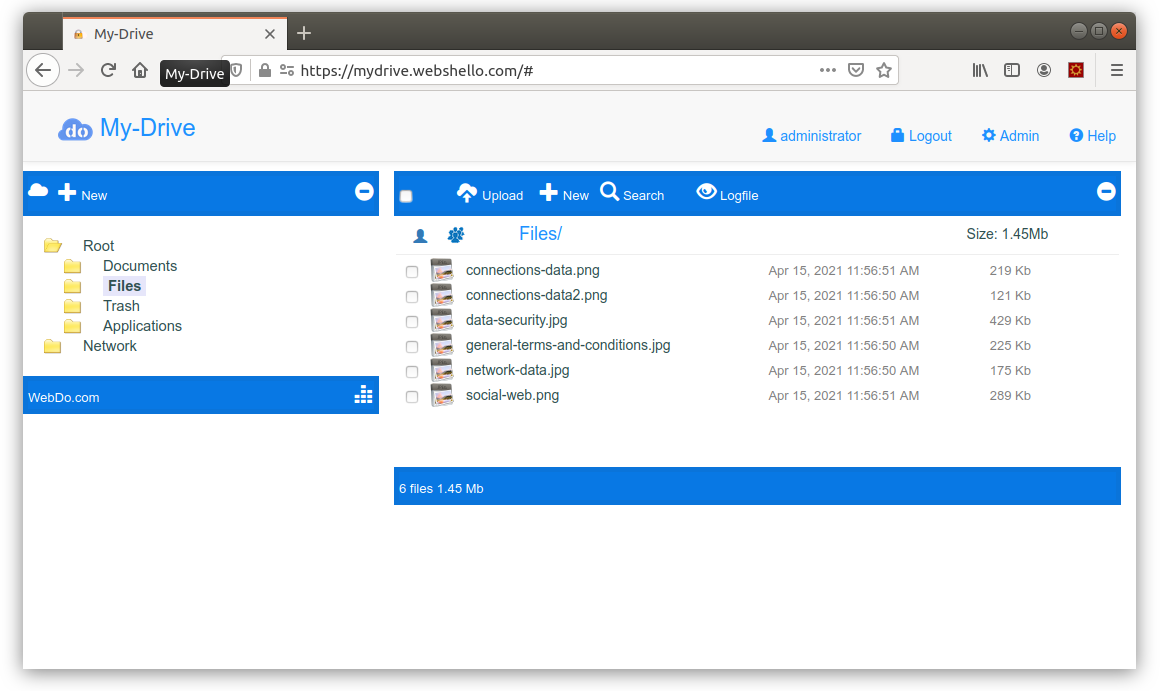
The WEB user interface is responsive and is based on standard "file manager" interfaces. Folders and files management is offered by default.
The WEB app is cross-platform. The same application is used on Smartphones, tablets and desktop. If used, IE should be greater than 11.
The "Network" folder is used for shared folders by other users.
The left panel is used to manage folders and folders tree structures navigation. Right panel shows the files and offer access to read, upload, copy, delete and other action's on files or current folder.
Simple user account management to change names and passwords, offer a login access list also.
There are basic information on system usage also:
- used storage
- user action log per folder

Shared folders
The system uses users and users groups to allow access to resources.
Each user can offer access for read or write to his folders to other users or to users groups.
One user can:
- access the shared folders using the special folder named "Network".
- can share one folder to users groups from witch it belongs.
These web pages are not using cookies and does not collect users information without express consent.